How to display nutrition facts labels in WordPress is a crucial aspect of website design for businesses that offer nutritional information. This guide dives deep into various methods, from simple HTML tables to powerful plugins, and covers everything from basic setup to advanced responsive design, ensuring your nutrition facts labels are not only informative but also user-friendly and accessible.
We’ll explore different approaches to integrating nutrition labels, examining the pros and cons of each. From custom code solutions to readily available plugins, you’ll find the perfect strategy to meet your specific needs and website design. We’ll also touch upon important aspects like data sources, user experience, and crucial responsive design considerations.
Introduction to Nutrition Facts Labels in WordPress
Nutrition facts labels are crucial for providing consumers with essential information about the nutritional content of food products. They detail the calories, macronutrients (protein, carbohydrates, and fat), vitamins, minerals, and other important nutrients present in a serving. This information empowers consumers to make informed dietary choices and understand the nutritional value of their food.Displaying these labels on a WordPress website allows businesses to be transparent with their customers about the products they offer.
This transparency fosters trust and can help attract health-conscious consumers. For example, a restaurant can showcase the nutritional information of its dishes, while a grocery store can highlight the nutritional profile of its products. Moreover, online platforms often require this information for compliance with certain regulations.
Common Use Cases for Nutrition Labels
Nutrition labels are beneficial in various contexts. Restaurants can use them to inform customers about the nutritional content of their dishes. Grocery stores can display nutrition labels for their products, helping customers compare options. Blogs or websites focused on healthy eating can showcase nutrition labels to illustrate specific dietary needs or guidelines.
Accessibility Considerations for Visual Impairments
Websites displaying nutrition labels should prioritize accessibility for individuals with visual impairments. This involves using sufficient contrast between text and background colors, providing alternative text descriptions for images, and utilizing screen reader-friendly formatting. For instance, ensure that the font size is adjustable and that tables of nutritional information are structured in a way that is easily navigable using screen reader software.
The use of appropriate color palettes is important; a high contrast ratio between text and background enhances readability for individuals with visual impairments.
Legal Requirements for Displaying Nutrition Labels
Legal requirements for displaying nutrition labels vary depending on the location and the type of product. Some jurisdictions may have specific regulations regarding the format, size, and content of nutrition labels. Always consult local regulations to ensure compliance. Failure to comply with local regulations can result in penalties or legal action. The legal requirements for nutrition labels may vary from country to country, so it is crucial to be aware of the local rules.
For instance, the U.S. Food and Drug Administration (FDA) has regulations regarding the content and format of nutrition labels.
WordPress Page Structure for Nutrition Facts Display
A simple WordPress page structure for displaying nutrition facts can include a table to neatly present the nutritional information. The table should have clear headings for each nutrient (e.g., Calories, Protein, Fat) and corresponding values for each item. Additionally, a clear description of the serving size should be provided, ideally in a separate section or within the table.
A simple example is as follows:
| Nutrient | Value |
|---|---|
| Calories | 200 |
| Protein | 10g |
| Fat | 12g |
This structured format is easy for users to scan and understand. The use of a table is highly recommended for clarity and organization. This table-based structure ensures a clear and organized presentation of nutrition facts. It’s also essential to provide a clear description of the serving size.
Methods for Integrating Nutrition Labels
Integrating nutrition facts labels into your WordPress site allows for easy access to crucial dietary information. This is particularly useful for blogs focusing on healthy eating, recipes, or nutrition education. Properly displayed nutrition information enhances user experience and builds trust with your audience. This section explores various methods for achieving this, from simple table integrations to more complex plugin solutions.Different methods exist for displaying nutrition facts tables, each with its own set of advantages and disadvantages.
Choosing the right method depends on the complexity of the data, the desired level of customization, and the technical skills of the WordPress administrator. We’ll examine both plugin-based approaches and custom coding solutions to help you select the most suitable method for your needs.
Using WordPress Plugins
Plugins provide a streamlined way to integrate nutrition labels, often with pre-built templates and options. They simplify the process of adding and formatting the data, reducing the need for extensive coding knowledge. Many plugins offer responsive design, ensuring the labels adapt to different screen sizes and devices.
- Popular plugins like “TablePress” or “Easy Table” enable easy creation and embedding of nutrition tables. These plugins offer various formatting options, allowing you to tailor the appearance of the table to match your site’s design.
- Some plugins allow for direct import of nutrition data from external sources, simplifying data entry and reducing the risk of errors.
- Using a plugin generally requires less technical effort, making it a good option for those unfamiliar with coding.
- However, plugin features might be limited, and customization options may not always align perfectly with specific design requirements.
Creating Responsive Tables with Custom Code
Custom code provides complete control over the presentation and functionality of the nutrition label. This approach allows for precise design adjustments, ensuring a perfect fit with the site’s theme and overall style. By using CSS and HTML, tables can be made responsive, automatically adjusting to different screen sizes.
- A custom approach allows for intricate design modifications. For example, you can add custom styling to highlight specific nutritional components or emphasize calorie information.
- You can also create interactive tables, potentially linking to detailed descriptions or related product pages. This enhances user engagement and provides further information.
- Implementing responsive design using CSS media queries ensures optimal display on various devices, from desktops to mobile phones. This is a crucial consideration for website accessibility.
- However, creating custom code requires familiarity with HTML, CSS, and potentially JavaScript. This method demands more technical skill and can be time-consuming.
Example of a Basic Nutrition Table, How to display nutrition facts labels in wordpress
| Nutrient | Amount | Unit | % Daily Value |
|---|---|---|---|
| Calories | 200 | kcal | 10% |
| Protein | 10 | g | 20% |
| Fat | 12 | g | 15% |
| Carbohydrates | 25 | g | 8% |
This simple example showcases a basic nutrition table. This format can be expanded and customized with additional columns or rows, depending on the specific information to be displayed.
Comparing Plugin and Custom Code
- Plugins offer a quick and easy way to integrate nutrition labels, requiring minimal technical expertise.
- Custom code provides greater control and flexibility for tailoring the presentation to precise design requirements, but it demands more technical skill.
- Plugins typically provide pre-built templates, saving development time. Custom code allows for greater design customization, creating a unique and visually appealing layout.
WordPress Plugins for Nutrition Facts Labels
WordPress offers a plethora of plugins to seamlessly integrate nutrition facts labels into your website. These plugins streamline the process, allowing you to efficiently display nutritional information for various food items. They often handle formatting, ensuring the data is presented clearly and accurately, vital for users seeking this information.Integrating nutrition facts labels directly into your WordPress website is easier than ever with readily available plugins.
Figuring out how to display nutrition facts labels in WordPress can be tricky, but it’s definitely achievable. Think about how technology firms are approaching their social media presence – like how they use visual cues and clear messaging. For example, how should technology firms tackle social media branding is a great resource for strategies.
Ultimately, a well-designed WordPress site with clear nutrition labels will help your users make informed choices.
These plugins take the burden of complex coding off your shoulders, allowing you to focus on the content and design of your site. They offer a range of features and functionalities to tailor the display of nutritional data to your specific needs.
Popular WordPress Plugins
A variety of plugins cater to displaying nutrition facts labels. Choosing the right one depends on your site’s specific requirements and the level of customization you need.
- Nutrition Facts Label Display: This plugin is designed specifically to handle nutrition facts label display. It provides a user-friendly interface for inputting data and offers various customization options for formatting. It’s particularly useful for websites focused on food, recipes, or nutrition-related content.
- Food & Nutrition Plugin: This plugin is comprehensive, encompassing more than just displaying labels. It might include functionalities for managing recipes, tracking ingredients, and potentially calculating nutritional values. This is beneficial for blogs or websites dedicated to detailed food information, but it might be overkill for sites with limited nutrition-related content.
- Recipe Plugin: Many recipe plugins, such as those focused on displaying and managing recipes, include features to display nutrition facts. These plugins are often geared towards recipe sites or blogs and provide a streamlined way to include this information alongside recipe instructions.
Features and Functionalities
Different plugins offer varied features. Some plugins might allow for the direct import of nutrition data from external sources, while others might necessitate manual input.
- Data Import/Export: Some plugins facilitate importing nutrition data from external databases or files. This feature is helpful for sites with a large volume of recipes or product listings. For instance, if a website sells numerous products, this functionality can streamline the process of displaying nutrition labels for each product.
- Customizable Formats: Plugins allow you to adjust the visual presentation of nutrition facts, from the font size and color to the arrangement of the table. You can tailor the look to match your website’s design. This feature ensures the labels fit seamlessly into the overall aesthetic of your website.
- Custom Fields: Plugins often provide custom fields to store additional nutritional information beyond the standard data found on labels. This allows for more detailed reporting, such as allergies or specific dietary restrictions.
Ease of Use and Customization
The ease of use and customization options vary significantly among plugins. User reviews and documentation are valuable resources for assessing the user experience.
- Intuitive Interface: A user-friendly interface is crucial for quick setup and modification. Some plugins might offer a drag-and-drop interface, making customization easier.
- Extensive Documentation: Thorough documentation and support resources are essential for troubleshooting and maximizing the plugin’s capabilities. This will save you time and effort in the long run.
- Extensive Customization Options: Customization options allow tailoring the look and feel of the nutrition label display. Some plugins might offer extensive styling options, while others might be limited in their customization capabilities.
Cost and Pricing Models
Pricing models for WordPress plugins vary widely. Some are free, while others have different pricing tiers based on features and functionalities.
| Plugin | Pricing | Features |
|---|---|---|
| Free Nutrition Facts Plugin | Free | Basic label display |
| Premium Nutrition Facts Plugin | Paid (e.g., subscription or one-time purchase) | Advanced features, customization, support |
Pros and Cons of Using a Plugin
Weighing the benefits against the drawbacks is important when considering using a plugin.
- Pros: Plugins save time and effort in integrating nutrition facts labels, offering a streamlined process for display. They typically handle the complex formatting and layout requirements, freeing up developers to focus on other aspects of the website. They can often provide advanced features and customization options to tailor the presentation to your website.
- Cons: Plugins may introduce dependencies, and if the plugin is not well-maintained, you might face compatibility issues. Potential compatibility problems with other plugins could also arise. The cost of plugins can vary, and selecting the right plugin for your specific needs can be challenging. Choosing the wrong plugin could result in a less-than-ideal solution.
Creating Custom Nutrition Facts Labels

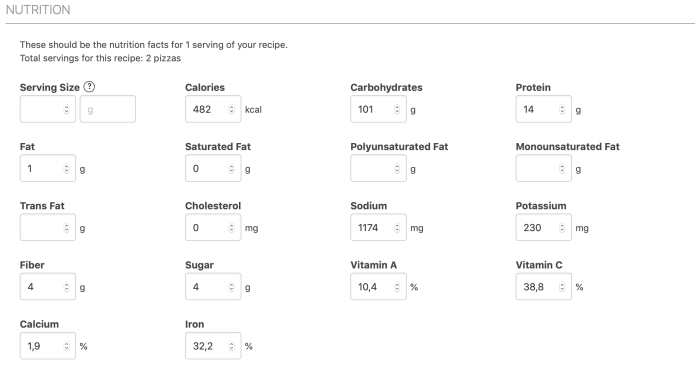
Custom nutrition labels are a powerful way to showcase precise nutritional information for your recipes or products in WordPress. This method allows for greater control over the presentation and data displayed, going beyond the limitations of pre-built plugins. It also provides a foundation for more dynamic and interactive experiences.
Basic HTML Table Structure
A well-structured HTML table is the cornerstone of a functional nutrition label. Responsive design principles are crucial for ensuring the label adapts to various screen sizes. This ensures readability and usability across desktops, tablets, and mobile devices.
| Food Item | Serving Size | Calories | Fat (g) | Saturated Fat (g) | Cholesterol (mg) | Sodium (mg) | Carbohydrates (g) | Fiber (g) | Sugar (g) | Protein (g) |
|---|---|---|---|---|---|---|---|---|---|---|
| Example Food | 1 cup | 150 | 8 | 3 | 20 | 250 | 25 | 5 | 10 | 5 |
This table structure provides a foundation for your label. Remember to add more columns as needed for different nutrients.
Responsive Design Principles
Using CSS, you can ensure the table adapts to different screen sizes. Media queries allow you to tailor styles for various devices. This is crucial for optimal user experience.
Responsive design principles involve using media queries to modify CSS based on the viewport size. This enables the label to adjust to different screen widths and maintain readability on various devices.
Adding the Table to WordPress
There are several ways to integrate this table into your WordPress posts or pages. Shortcodes provide a concise method for embedding the table, while custom functions offer more control and flexibility.
Shortcodes: Shortcodes offer a simpler method for embedding the table, making it easier to manage the nutrition label content. You can create a shortcode that outputs the entire table, enabling its display throughout your site.
Custom Functions: For more complex needs, custom functions offer more control. These functions can dynamically populate the table based on user input or data from a database. This is particularly useful when you have a large amount of data or when you need to retrieve information from a database.
Dynamic Table Population
Dynamically populating the table with data from a database or a data source is achievable. This approach is especially useful for displaying various nutrition facts across different recipes or products. PHP can fetch and process data, creating the HTML table dynamically.
Example PHP Code (Custom Function):
<?php
function nutrition_table($food_item, $serving_size, $calories, $fat, $saturated_fat)
// ... (Retrieve more data as needed)
$html = '';
$html .= ' Food Item Serving Size Calories Fat '.$food_item.' '.$serving_size.' '.$calories.' '.$fat.'
';
return $html;
?>
This example demonstrates a simple function to populate a basic table. Enhance this function with your desired columns and data sources.
CSS Styling and Formatting
CSS is essential for customizing the look and feel of your nutrition label. Styles for font sizes, colors, borders, and table layout should be applied using CSS. The aim is to create a clean and readable presentation.
Example CSS:
table
  width: 100%;
  border-collapse: collapse;

th, td
  border: 1px solid #ddd;
  padding: 8px;
  text-align: left;

th
  background-color: #f2f2f2;
Data Sources and Integration
Getting nutrition data for your WordPress nutrition labels involves careful consideration of reliable sources and efficient integration methods. Accurate and up-to-date information is crucial for providing users with precise nutritional details. This section will explore various data sources, APIs, and structured data formats, along with strategies for handling potential issues like missing or erroneous data.
The key to displaying dynamic nutrition labels is to connect your WordPress site to a reliable source of nutrition information. This can be achieved through APIs or pre-existing databases, allowing for automatic updates and ensuring your labels always reflect the most current details. Proper data structuring is essential for the smooth display of this information within the WordPress table, enabling a user-friendly and informative experience.
Want to easily show nutrition facts on your WordPress site? It’s surprisingly straightforward. You can find tons of plugins to make this super simple. But, if you’re aiming to build a robust e-commerce platform for your digital products, you’ll need a more advanced setup. Check out this guide on how to create a digital product marketplace in WordPress for a deeper dive into that.
Once you’ve got your digital storefront sorted, remember that accurate nutrition information is key, so make sure you’ve got your nutrition labels formatted correctly. This will help you make your website more user-friendly.
Obtaining Nutrition Data
Several avenues exist for obtaining nutrition data for your labels. The most common approach is to utilize publicly available APIs from food databases or nutritional analysis tools. These APIs often offer a wealth of information, including calories, macronutrients, vitamins, and minerals. Alternatively, you can employ existing databases containing pre-populated nutrition information. Careful consideration of the API’s terms of service and the data’s accuracy is paramount.
Using APIs and Databases
Integrating nutrition APIs into your WordPress site involves several steps. First, identify a suitable API based on your specific needs. Then, develop a custom WordPress plugin or use a dedicated API integration plugin to handle the communication with the API. This will involve constructing requests to the API and processing the returned data. Importantly, consider error handling within your plugin to deal with potential issues like API rate limits, invalid responses, or missing data.
Consider using a caching mechanism to reduce API calls and optimize performance.
Structured Data Formats
Using structured data formats, such as JSON or CSV, significantly improves the efficiency of data handling and integration. JSON (JavaScript Object Notation) is a lightweight data-interchange format that’s easily parsed and processed. CSV (Comma-Separated Values) is a simple format for tabular data, particularly useful for large datasets. Using a consistent format across all data sources will ensure a smooth integration process.
Example: JSON Data Structure
“`json
[
“food_name”: “Apple”,
“calories”: 95,
“protein”: 0.3,
“fat”: 0.2,
“carbohydrates”: 25
,
“food_name”: “Banana”,
“calories”: 105,
“protein”: 1.1,
“fat”: 0.3,
“carbohydrates”: 27
]
“`
This example demonstrates a JSON structure containing key-value pairs representing nutritional information for different food items. This structure is easily parsed and used to populate the WordPress table with accurate details.
Handling Errors and Missing Data
It’s crucial to anticipate potential errors and missing data. Implement robust error handling within your plugin to catch and manage cases where the API returns an error or data is unavailable. Display informative messages to the user if the data is missing or if there are any problems retrieving it from the API. Consider default values for missing data to prevent the display of blank fields in the nutrition table.
User Interface and User Experience: How To Display Nutrition Facts Labels In WordPress
Presenting nutrition facts in a user-friendly way is crucial for encouraging users to access and understand the information. A well-designed interface can make the process of comparing products and making informed choices easier and more enjoyable. A clear, concise, and visually appealing display is key to maximizing user engagement and driving better decision-making.
A well-structured user interface should prioritize readability and accessibility. The design should be intuitive and easy to navigate, allowing users to quickly find the specific information they need. This involves a careful consideration of the layout, color scheme, and font choices to optimize the user experience.
Intuitive Layout Design
A well-designed layout is critical for making nutrition information easily digestible. A clean and uncluttered design reduces visual noise and allows users to focus on the key data points. This includes using clear headings, subheadings, and visual cues to distinguish different types of information.
- Consistent Formatting: Employing consistent formatting across different product pages ensures a uniform experience for users. This includes using consistent font sizes, colors, and spacing to create a cohesive visual language.
- Visual Hierarchy: Use visual cues, such as size and color, to highlight important information, like calorie counts or serving sizes. This helps users quickly identify the most crucial details.
- Clear Grouping: Group related information logically. For example, nutritional content (calories, fat, protein) can be grouped together, while ingredients can be presented separately.
Effective Visual Design Elements
Visual elements play a significant role in enhancing the user experience and making nutrition information more appealing and understandable. Effective choices in color, typography, and imagery can significantly impact how users perceive and interact with the data.
- Color Coding: Employ color coding to differentiate different nutrient categories (e.g., green for vitamins, red for saturated fat). This allows users to quickly identify and compare the nutrient content of various products.
- Iconography: Use icons to visually represent different nutrients, such as a spoon for serving size or a heart for vitamins. This helps to enhance comprehension and engagement.
- Charts and Graphs: Incorporate charts or graphs to visually represent nutritional data, such as percentage daily values or the distribution of nutrients within a serving. This provides a concise overview and helps users grasp the overall nutritional profile.
Importance of Proper Labeling and Formatting
Clear and accurate labeling is crucial for ensuring users can interpret the data correctly. Consistent formatting ensures that the data is easily comparable across different products. Precise labeling avoids confusion and ensures users understand the implications of the nutritional information.
- Accurate Units: Use standard units of measurement for all nutritional data (e.g., grams, milligrams). This promotes consistency and avoids misinterpretations.
- Precise Serving Sizes: Clearly indicate the serving size for each product. This is essential for accurate calculations of daily nutritional intake.
- Easy-to-Read Font: Use a clear and legible font size and style for all nutritional information to enhance readability.
User-Friendly Layout Examples
A well-structured layout improves the user experience by making the information more accessible and user-friendly. Different layouts can be implemented to enhance readability and ensure users can quickly identify the key details.
| Layout Example 1 | Layout Example 2 |
|---|---|
|
A simple, grid-based layout with clearly defined columns for different nutritional components. Each component is color-coded for easier differentiation. |
A layout using icons to represent different nutrients, making the information visually appealing and memorable. The icons are paired with clear labels and values. |
Responsive Design Considerations

Nutrition facts labels need to be accessible and understandable on all devices. Responsive design ensures that the information is presented clearly and efficiently, whether a user is viewing the label on a desktop computer, tablet, or smartphone. This adaptability is crucial for a positive user experience and ensures that the nutritional information is easily digestible across various screen sizes.The design must prioritize readability and usability.
Complex layouts that work well on large screens might become cluttered or illegible on smaller displays. A well-designed responsive nutrition label will adapt its presentation seamlessly, maintaining clarity and accuracy regardless of the device used.
Importance of Responsive Design
Responsive design is essential for providing a consistent user experience across different devices. Users expect information to be easily accessible and understandable regardless of the screen size or type of device. A well-designed responsive label ensures that the nutritional information is readily available and presented in a clear, concise manner on all devices.
CSS Techniques for Responsive Tables
CSS offers various techniques to create responsive tables. One effective method is using relative units like percentages for widths and heights. This allows the table to adjust its size proportionally to the screen. For example, defining table cells with widths expressed as percentages will make them resize accordingly when the screen size changes. Additionally, using media queries, which target specific screen sizes, can tailor the table’s appearance for optimal display.
Media Queries for Adapting Display
Media queries are powerful tools for creating responsive tables. They allow you to apply different styles based on the characteristics of the device, such as screen width, orientation, or resolution. Using media queries to adjust font sizes, table widths, and other layout elements will make the label adapt to various screen sizes. For example, a media query targeting screens with a width below 768 pixels could reduce the font size to improve readability on mobile devices.
The following example demonstrates how media queries can dynamically adjust the label’s appearance:“`CSS@media (max-width: 768px) table font-size: 12px; width: 90%; /* Adjust width for smaller screens – / th, td padding: 5px; /* Reduce padding for better fit – / “`
HTML Table Designs for Mobile and Desktop
Different HTML table structures are suitable for various screen sizes. For desktop displays, a wider layout with more columns might be optimal, presenting a comprehensive view of the nutrition data. However, for mobile devices, a more compact table structure with condensed columns is essential to maintain readability and avoid scrolling. An example:“`HTML
Want to easily display nutrition facts labels on your WordPress site? There are various plugins available to make this a breeze. Knowing how to properly format the data is key, and luckily, there are plenty of tutorials online. This is a crucial aspect for any healthy eating blog, especially if you’re following the news about big tech companies, like the recent announcement that Jerry Dischler leaves Google after nearly 20 years.
Once you get the hang of it, displaying nutrition labels becomes a straightforward process, enhancing user experience and building trust.
| Nutrient | Value | Unit |
|---|---|---|
| Calories | 200 | kcal |
| Fat | 10g | g |
| Nutrient | Value |
|---|---|
| Calories | 200 kcal |
| Fat | 10g |
“`
Testing Responsiveness
Thorough testing is critical to ensure the nutrition label’s responsiveness across different devices. This includes using various screen sizes and orientations. Employing browser developer tools, especially the responsive design mode, will help in assessing how the label adapts to different screen dimensions. Emulating different devices using responsive design testing tools and ensuring consistent presentation across various screen sizes are essential steps in guaranteeing a positive user experience.
Employing these methods will ensure the label’s usability and accessibility on all devices.
Security and Data Integrity
Building trust in a nutrition facts display relies heavily on the security and integrity of the data. Users need confidence that the information they’re seeing is accurate and up-to-date. This section Artikels crucial steps for ensuring data reliability and preventing potential vulnerabilities.Data sources need careful consideration. The accuracy of the entire display hinges on the accuracy of the initial information.
Compromised or outdated data sources can lead to misinformation and user mistrust. Furthermore, the process for updating data needs to be robust and auditable to maintain reliability.
Securing Data Sources
Ensuring the reliability of data sources is paramount. This involves verifying the authenticity and trustworthiness of the data providers. Employing secure connections (HTTPS) is essential for transmitting nutrition information. Regular audits of data sources and their update procedures are necessary to maintain accuracy.
- Establish clear data governance policies that Artikel the processes for data acquisition, validation, and maintenance.
- Utilize secure authentication and authorization mechanisms to control access to sensitive data.
- Employ encryption methods to protect data in transit and at rest.
Data Validation and Sanitization
Thorough validation and sanitization are critical steps in the data handling process. This prevents invalid or malicious input from corrupting the nutrition information. Regular checks for data inconsistencies and anomalies are crucial to detect potential issues early.
- Implement input validation rules to ensure data conforms to expected formats and ranges.
- Sanitize user input to remove potentially harmful characters or code.
- Use data type checking to confirm that the data conforms to the intended format, for instance, checking if a quantity is a number.
Preventing Security Vulnerabilities
Proactive measures are needed to prevent potential security vulnerabilities. These measures involve careful code review, regular security assessments, and the implementation of robust error handling. Careful attention to input sanitization is key to avoiding malicious code injection attacks.
- Regularly update software and libraries to patch known vulnerabilities.
- Conduct penetration testing to identify and address potential weaknesses.
- Implement secure coding practices to minimize the risk of vulnerabilities during development.
Handling Inaccurate Data
Inaccurate data is a risk that needs to be addressed. Clear processes are required for handling discrepancies and correcting errors. This involves a defined procedure for reporting, investigating, and correcting inaccuracies. Tracking changes in data is also important for maintaining a historical record of any modifications.
- Establish a system for reporting and tracking data inaccuracies.
- Develop a procedure for validating and correcting identified errors.
- Maintain an audit trail of all data modifications to ensure transparency and accountability.
Handling User Input
User input regarding nutrition information needs careful handling. This includes validating user-provided data to ensure it meets specific criteria. User input should be treated with caution, as it may be subject to human error.
- Implement validation rules to ensure user input adheres to expected formats and constraints.
- Sanitize user input to prevent potential security risks.
- Provide clear and concise instructions to users on how to provide accurate nutrition information.
Last Word
In conclusion, displaying nutrition facts labels effectively in WordPress is achievable with careful planning and implementation. Whether you choose a plugin for ease of use or craft custom code for maximum control, remember to prioritize user experience, accessibility, and data integrity. By following this comprehensive guide, you’ll be well-equipped to create a visually appealing and informative nutrition label display on your WordPress site.