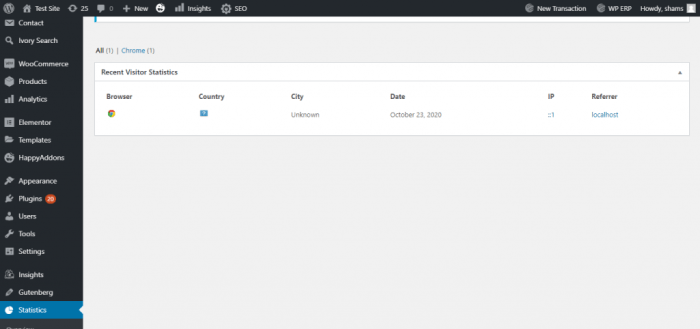
How to track website visitors to your WordPress site sets the stage for optimizing your online presence. Understanding who visits your site, how they navigate, and what they’re looking for is crucial for improving user experience and ultimately, boosting your WordPress site’s success. From basic analytics to advanced techniques like A/B testing, this guide covers everything you need to know to effectively track and analyze your website traffic.
This comprehensive guide will walk you through the process of tracking website visitors on your WordPress site, from choosing the right tracking method to interpreting the data and using it to optimize your site’s design and content. We’ll cover everything from introductory concepts to advanced techniques, ensuring you have a complete toolkit to understand and engage your audience.
Introduction to Website Visitor Tracking
Understanding your website visitors is crucial for any WordPress site owner looking to grow their audience and achieve their online goals. Knowing who’s visiting your site, what they’re looking at, and how they’re interacting with your content is invaluable for improving user experience, optimizing your site’s performance, and ultimately, driving conversions. This knowledge empowers you to tailor your content, design, and marketing strategies to better meet the needs of your target audience.Website visitor tracking provides insights into a variety of crucial aspects of your site’s performance.
This includes identifying popular pages, understanding user journeys, pinpointing areas needing improvement, and enabling you to create a more engaging and effective online presence. By monitoring user behavior, you can make informed decisions about content updates, site design adjustments, and marketing campaigns, ultimately boosting your site’s success.
Importance of Visitor Tracking for WordPress Sites
Knowing your website visitors empowers you to create a more user-friendly experience, optimize content, and drive conversions. Understanding what content resonates with your audience allows for targeted improvements, leading to a better user experience and increased engagement. Data analysis from visitor tracking allows you to identify and address issues related to navigation, layout, and page load times, ultimately enhancing user satisfaction and site performance.
Types of Visitor Data That Can Be Tracked
Visitor tracking provides a wealth of data about how users interact with your WordPress site. This data encompasses a wide range of information, from basic demographics to detailed behavioral patterns. Accurate tracking of this data allows you to make informed decisions that impact the overall user experience.
| Metric | Description | Importance | Example |
|---|---|---|---|
| Page Views | The total number of times a specific page is viewed. | Indicates popularity of content and potential areas for improvement. | High page views on a specific blog post suggest its relevance to the target audience. |
| Bounce Rate | Percentage of visitors who leave your site after viewing only one page. | Highlights potential issues with content relevance, navigation, or user experience. | High bounce rate on the homepage could indicate a need for clearer calls to action or more engaging content. |
| Session Duration | Average time spent by visitors on your site. | Provides insight into content engagement and user interest. | Short session duration on product pages could suggest unclear product descriptions or poor navigation. |
| Conversion Rate | Percentage of visitors who complete a desired action (e.g., making a purchase, signing up for a newsletter). | Measures the effectiveness of your website in achieving desired outcomes. | Low conversion rate on a landing page might indicate the need for stronger calls to action or better page design. |
| Traffic Sources | Where visitors are coming from (e.g., search engines, social media, referrals). | Helps understand marketing effectiveness and identify high-performing channels. | High traffic from social media indicates the potential for more social media engagement and marketing strategies. |
User Experience (UX) and Visitor Tracking
Visitor tracking data directly influences the user experience (UX) on your WordPress site. By analyzing this data, you can identify pain points in the user journey, such as confusing navigation or slow page load times, and make necessary improvements. This continuous optimization based on data analysis ensures a positive and engaging user experience.
Choosing the Right Tracking Method
Picking the right website visitor tracking method for your WordPress site is crucial for understanding your audience and optimizing your content. Different tools offer varying levels of functionality, so careful consideration is key. This section will detail various methods, their strengths, weaknesses, and suitable use cases.Effective tracking empowers informed decisions, from improving website navigation to crafting targeted marketing campaigns.
The right choice depends on your specific needs and resources.
Different Visitor Tracking Methods
Various tools cater to different website tracking needs. Choosing the right method hinges on factors like budget, desired level of detail, and technical expertise. The available options range from simple, free tools to comprehensive, paid solutions.
- Google Analytics: A powerful and widely used free analytics platform offered by Google. It provides detailed insights into website traffic, user behavior, and demographics. Its robust reporting features allow for in-depth analysis of visitor journeys, helping you understand where users are coming from, what pages they visit, and how long they stay.
- WordPress Analytics: A built-in WordPress plugin offering basic tracking capabilities. It’s user-friendly and easy to set up, but its features are limited compared to dedicated analytics platforms. This option is ideal for those with simple needs and limited budgets, or for supplementary tracking alongside a more comprehensive solution.
- Matomo (formerly Piwik): A free and open-source web analytics platform. It offers a similar range of features to Google Analytics but with the added benefit of data ownership and control. This is a great option for users who value data privacy and want complete control over their tracking data.
- Hotjar: A user experience (UX) testing and analytics tool that provides heatmaps, recordings, and surveys to understand how users interact with your website. This goes beyond basic traffic data to reveal user behavior patterns, pain points, and areas for improvement.
Comparative Analysis of Tracking Tools
The table below Artikels the key features, pros, and cons of different tracking tools. This comparative analysis aids in selecting the most suitable option.
| Method | Description | Pros | Cons |
|---|---|---|---|
| Google Analytics | Free, powerful, comprehensive analytics platform. | Detailed insights, robust reporting, vast community support. | Requires some technical understanding, potential data privacy concerns. |
| WordPress Analytics | Built-in WordPress plugin, easy to set up. | Simple, user-friendly interface, no additional software needed. | Limited features, less detailed data compared to dedicated analytics platforms. |
| Matomo | Open-source, free analytics platform. | Data privacy focused, full control over data, customizable. | Steeper learning curve, potentially less support compared to Google Analytics. |
| Hotjar | UX testing and analytics tool. | Provides user behavior insights, heatmaps, recordings, and surveys. | More expensive than other tools, might require more technical expertise. |
Popular Tracking Tools and Examples, How to track website visitors to your wordpress site
Google Analytics is a widely used free platform. It provides a wealth of data about website traffic, user behavior, and demographics. Matomo, a free and open-source alternative, offers similar functionality with enhanced data privacy control. WordPress Analytics, a built-in plugin, offers basic but sufficient tracking for smaller sites. Hotjar provides more detailed insights into user interactions, ideal for optimizing the user experience.
Setting Up Tracking Tools
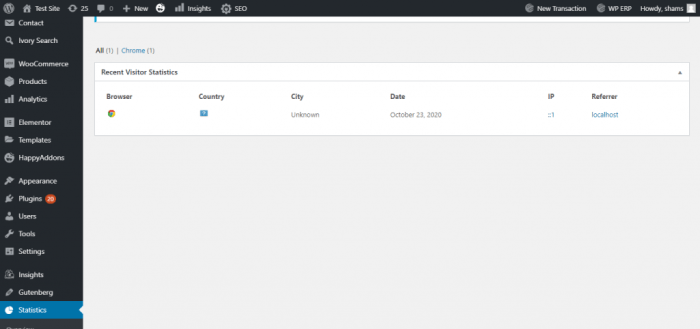
Getting your website visitor tracking set up correctly is crucial for understanding your audience and optimizing your site for better performance. This step involves installing and configuring the chosen tracking tool, ensuring smooth integration without hindering your site’s speed. Proper implementation is key to accurate data collection and informed decisions about content, design, and overall user experience.Choosing the right tracking tool and seamlessly integrating it into your WordPress website is essential.
The right configuration prevents conflicts with your site’s performance and allows for the collection of accurate and reliable visitor data. This section will provide detailed steps for setting up various tracking methods, with a focus on minimizing potential performance issues.
Installing and Configuring Google Analytics
Google Analytics is a popular and powerful tool for tracking website visitors. It provides a comprehensive overview of website traffic, user behavior, and demographics. To effectively leverage this tool, proper installation and configuration are paramount.
- Step 1: Create a Google Analytics Account. This involves signing up for a free Google Analytics account, if you don’t already have one. Be sure to note the account and property IDs, as these are critical for the next steps.
- Step 2: Obtain the Tracking Code. Once your account is set up, navigate to the relevant property in Google Analytics and locate the tracking code (a snippet of JavaScript). This code is specific to your website.
- Step 3: Integrate the Tracking Code into WordPress. You can typically integrate this code in one of two ways: using a plugin or directly editing your theme files. A plugin like “Insert Headers and Footers” makes this process straightforward and less prone to errors. If editing theme files, ensure you locate the appropriate place in your theme’s header.php or footer.php file to avoid conflicts.
- Step 4: Verify Installation. After adding the tracking code, visit your website. In Google Analytics, verify that data is being collected. This ensures the tracking code is correctly integrated. If there are issues, check for syntax errors and ensure the code is pasted in the correct location.
- Step 5: Set up Goals and Segments. Defining goals (e.g., completing a form, making a purchase) allows you to measure the success of specific actions on your site. Creating segments helps you analyze specific user groups and tailor your strategies to different audiences.
Ensuring Optimal Performance
Installing tracking tools without affecting website speed is crucial for a positive user experience. Slow loading times can deter visitors and negatively impact your search engine rankings. Here’s how to minimize performance impact:
- Optimize Tracking Code. Ensure the tracking code is optimized for minimal impact on page load time. Avoid unnecessary scripts and requests that could increase loading times. Use asynchronous loading methods where possible to prevent blocking.
- Use a CDN (Content Delivery Network). A CDN can significantly improve website performance by caching static assets and delivering them from servers closer to users. This reduces load times and can help mitigate any performance issues related to the tracking tool.
- Regularly Monitor Website Performance. Using tools like Google PageSpeed Insights, you can identify potential performance bottlenecks. This helps in promptly addressing any issues related to the tracking code.
Detailed Setup Steps for Google Analytics
The following table provides a structured approach to setting up Google Analytics on your WordPress site.
| Step | Action | Explanation |
|---|---|---|
| 1 | Create a Google Analytics account | Sign up for a free account and set up a property for your website. |
| 2 | Obtain tracking code | Locate and copy the tracking code from your Google Analytics account. |
| 3 | Identify integration method | Choose whether to use a plugin (recommended) or manually edit theme files. |
| 4 | Integrate tracking code | Paste the tracking code into the appropriate location within your WordPress theme or using a plugin. |
| 5 | Verify installation | Check that data is being collected in your Google Analytics dashboard. |
| 6 | Set up goals and segments | Define specific actions (goals) and user groups (segments) for analysis. |
Understanding Visitor Data
Once you’ve set up your website visitor tracking, the real work begins: interpreting the data. This isn’t just about seeing numbers; it’s about understandingwhy* visitors behave the way they do. By digging into the data, you can identify patterns, understand user journeys, and ultimately optimize your site for better performance and conversions. This section delves into how to make sense of the information your tracking tools collect.Knowing how to interpret visitor data is crucial for making informed decisions about your website.
It’s not enough to simply see numbers; you need to understand the context behind them. This includes identifying trends, understanding user behavior, and making connections between different data points. This analysis helps you to improve your website’s structure, content, and user experience, ultimately leading to more engagement and conversions.
Interpreting Collected Data
Effective interpretation of visitor data involves more than just looking at raw numbers. It requires a keen eye for patterns and an understanding of how different metrics relate to each other. For example, a high bounce rate might indicate a problem with your website’s landing page, while a low time-on-site could suggest your content isn’t engaging enough. A crucial aspect is relating data points to each other; a low conversion rate alongside a high time-on-site might suggest that while visitors are spending time on the site, they aren’t completing the desired action.
Visualizing Visitor Data
Data visualization is key to understanding visitor behavior. Transforming raw data into charts and graphs allows you to quickly spot trends and patterns. Different types of visualizations highlight different aspects of visitor data, making it easier to understand what’s working and what’s not. By using effective visualizations, you can quickly identify areas for improvement and optimize your website for better performance.
Types of Reports and Dashboards
Tracking tools often provide various reports and dashboards to present data in digestible formats. These can range from simple summaries to detailed analyses. For instance, you might have a report on the most popular pages, showing which content resonates most with your audience. Other reports could focus on user behavior on specific pages, revealing potential issues with design or navigation.
A well-structured dashboard can present multiple reports in a consolidated view, offering a holistic picture of website performance. Examples of such reports include:
- Landing Page Performance: This report highlights the performance of different landing pages, showing which pages are attracting the most visitors and leading to the highest conversion rates. This is vital for understanding which calls to action are effective and which pages need improvement.
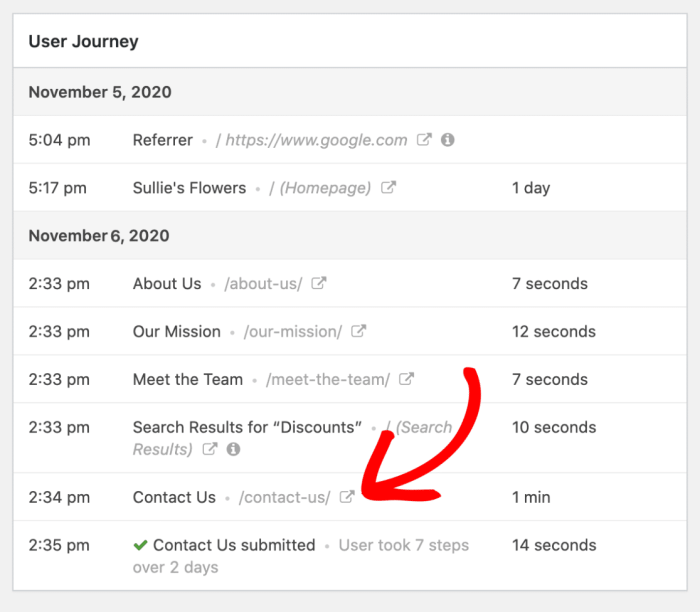
- User Journey Analysis: This report tracks the path users take through your website. It reveals where users are dropping off and what steps might be causing friction in the user experience. This allows you to identify bottlenecks in the user journey and improve navigation or content to address these issues.
- Geographic Location of Visitors: This report provides insights into the geographic distribution of your website visitors. This can be helpful for understanding your target audience and optimizing your content and marketing efforts for different regions.
Identifying Patterns and Trends
Identifying patterns and trends in visitor behavior is essential for understanding user needs and preferences. For instance, if you notice a significant increase in visitors from a specific country during a particular season, it might indicate a successful marketing campaign or a seasonal interest in your product or service. Analyzing trends over time allows you to proactively adapt to changes in user behavior and optimize your website accordingly.
Visitor Data Visualizations
The following table presents various visualization types, their descriptions, and typical use cases:
| Visualization Type | Description | Use Case |
|---|---|---|
| Bar Chart | Displays comparisons among categories using bars of different heights. | Comparing page views, bounce rates, or conversion rates across different pages. |
| Line Graph | Shows trends over time using lines connecting data points. | Tracking website traffic growth, identifying seasonal patterns, or monitoring conversion rates over time. |
| Pie Chart | Represents data as slices of a circle, showing proportions. | Displaying the percentage of visitors from different geographic locations, or the distribution of user engagement on different pages. |
| Scatter Plot | Illustrates the relationship between two variables using points on a graph. | Analyzing the correlation between time spent on site and conversion rates, or the relationship between specific user demographics and their actions on the website. |
| Heatmap | Visualizes data using colors to represent values. | Highlighting areas on a webpage with high or low user engagement. |
Optimizing Website for Visitors
Knowing your website visitors is crucial for improving its performance and user experience. Analyzing visitor data allows you to fine-tune your site’s design, content, and overall structure to better meet the needs and preferences of your audience. This ultimately leads to higher engagement, increased conversions, and a more successful online presence.Understanding visitor behavior is the key to making data-driven decisions for website optimization.
By identifying patterns in how visitors interact with your site, you can uncover areas for improvement, leading to a more user-friendly and effective online experience.
Using Visitor Data to Enhance User Experience (UX)
Analyzing visitor behavior reveals insights into user pain points and areas where the website could be improved. Understanding how visitors navigate your site, which pages they spend the most time on, and which pages lead to the most drop-offs is crucial for refining the overall user experience. For instance, if visitors frequently abandon the checkout process, you can identify and address the problem areas, like complex forms or unclear instructions.
Identifying Areas for Improvement Based on Visitor Behavior
Identifying areas for improvement involves meticulous analysis of visitor data. By understanding where visitors spend time, which pages are most popular, and which pages result in high bounce rates, you can pinpoint areas for improvement. For example, a high bounce rate on the contact page might indicate unclear instructions or an inefficient form. Identifying these specific areas allows you to implement targeted solutions.
Strategies to Enhance Website Design and Content
Optimizing website design and content requires a structured approach. For example, if your analysis shows visitors are leaving the product page, you can investigate factors such as unclear product descriptions, poor image quality, or lack of compelling call-to-actions. Implementing improvements, such as detailed product descriptions, high-quality images, and clear calls-to-action, can lead to better user engagement. This process is continuous and requires constant monitoring and adjustment based on the collected data.
Personalizing the Website Experience
Personalization can significantly improve user engagement. Based on visitor data, you can tailor the website’s content and design to individual preferences. For instance, if a visitor frequently views products in a specific category, you can recommend similar items or products in the same category. This personalized approach creates a more relevant and engaging experience, ultimately leading to higher conversion rates.
Examples of Website Performance Improvement
Numerous examples demonstrate the positive impact of data-driven optimization. One company noticed a significant drop-off in visitors on a particular landing page. After investigating, they found that the page’s layout was confusing and the call-to-action button was difficult to find. By redesigning the page, improving the layout, and making the button more prominent, they saw a 20% increase in conversions.
This exemplifies how understanding visitor behavior can lead to tangible improvements in website performance.
Figuring out how to track website visitors on your WordPress site is key for understanding your audience. Knowing who’s visiting and what they’re doing is crucial for optimizing your site. For instance, you can use tools to see which pages are popular and adjust content accordingly. But if you want a deeper dive into the strategies behind optimizing your business goals, check out this helpful resource on understanding SaaS goals vs.
segments for optimal success the ultimate guide to harnessing saas goals vs segments for optimal success. This knowledge will help you refine your visitor tracking strategy and make sure you’re targeting the right people with the right message. Ultimately, better understanding your audience will make your WordPress site more successful.
Advanced Tracking Techniques: How To Track Website Visitors To Your WordPress Site
Diving deeper into website visitor tracking reveals a wealth of advanced techniques that can significantly enhance your understanding of user behavior and ultimately optimize your site’s performance. These methods go beyond basic analytics, allowing you to fine-tune elements like design, content, and calls to action to maximize conversions and engagement. We’ll explore A/B testing, heatmaps, and session recordings, powerful tools for understanding user journeys and improving the overall user experience.Advanced tracking techniques provide a more nuanced understanding of user behavior, enabling targeted improvements to site design and functionality.
Want to know who’s checking out your WordPress site? Tracking website visitors is key, and there are tons of plugins to help. But, optimizing customer interactions also relies on efficiency within your support team. For example, a well-optimized Salesforce Service Cloud can dramatically boost agent productivity, making them more responsive and knowledgeable to help customers. This ultimately improves your website’s reputation and helps you get more sales, so make sure to check out how Salesforce Service Cloud boosts agent productivity to learn more.
Ultimately, the better your support system is, the better your website analytics will reflect that.

By combining these techniques with the data from basic tracking methods, you gain a holistic perspective on how visitors interact with your website, allowing for more effective optimization strategies.
A/B Testing
A/B testing is a crucial method for optimizing website elements based on user responses. It involves creating two versions of a webpage element (e.g., a button, a headline, or a form) and randomly presenting each version to a segment of your audience. By comparing the performance of each variation, you can identify which version performs better in terms of conversions, engagement, or other key metrics.
Figuring out how to track website visitors on your WordPress site is crucial. Knowing where your traffic is coming from helps you tailor your content and marketing efforts. For instance, you can use analytics tools to understand user behavior, which is often a key element in how to drive app installs using Google AdWords. How to drive app installs using Google AdWords can help boost your app’s visibility.
Ultimately, understanding your website traffic gives you valuable insights for better optimization, so you can refine your strategies to attract more visitors.
- Hypothesis Formation: Before implementing A/B testing, clearly define the hypothesis you want to test. For example, “Will a redesigned call-to-action button increase click-through rates?”
- Variation Creation: Create variations of the element you wish to test. For example, two different button colors, or two distinct headlines. Key is to focus on testing one variable at a time to isolate the impact of each change.
- Traffic Allocation: Randomly assign users to either the original version (A) or the variation (B) to ensure unbiased results. Using a tool like Google Optimize, this can be managed efficiently.
- Data Analysis: Track key metrics for each variation and analyze the results. A statistically significant difference in conversion rates, click-through rates, or other chosen metrics indicates which variation performs better. Tools like Google Analytics provide the necessary data.
Heatmaps
Heatmaps visualize user behavior on a webpage by highlighting areas of high and low interaction. They illustrate where users are clicking, scrolling, and spending the most time. These visual representations are invaluable for understanding user engagement patterns and identifying potential areas for improvement.
- Visualizing User Engagement: Heatmaps show, visually, where users interact most on a page. Areas with high click density are highlighted, showing where users are actively engaging.
- Identifying Usability Issues: Heatmaps reveal areas of the website that users might be ignoring or having difficulty navigating. This often suggests design flaws or unclear information architecture.
- Improving User Experience: By identifying areas of low engagement, you can restructure elements to make them more visually appealing and user-friendly, such as adding clearer calls to action or reorganizing content.
Session Recordings
Session recordings provide a complete view of how users interact with your website, capturing every mouse movement, click, and scroll. This detailed view is invaluable for understanding the complete user journey and identifying pain points.
- Understanding User Journeys: Session recordings show the full path a user takes through your website, revealing how they interact with various elements.
- Identifying Navigation Problems: Observe where users get lost or struggle to find what they need. This directly points to potential issues in website navigation or content structure.
- Improving User Experience: By observing how users interact with your website, you can identify areas needing improvement in navigation, design, or content organization.
Implementing A/B Testing on WordPress
WordPress offers several plugins that can facilitate A/B testing. Plugins like Google Optimize and others can be integrated into your WordPress site to manage the testing process effectively. This allows for straightforward implementation and analysis without significant technical expertise. Follow the plugin’s instructions for configuration and testing setup.
Security and Privacy Considerations
Visitor tracking, while invaluable for website optimization, demands meticulous attention to security and privacy. Ignoring these aspects can lead to serious issues, ranging from data breaches to legal repercussions. This section delves into the crucial steps to protect visitor data and ensure compliance with relevant regulations.Protecting visitor data is paramount. Just as a well-fortified castle safeguards its inhabitants, a secure website protects its visitors’ information.
Robust security measures are not merely desirable, they are essential for building trust and maintaining a positive user experience.
Importance of Website Security
Website security is intrinsically linked to visitor trust. A secure website instills confidence in visitors, encouraging them to interact more readily and potentially return for future engagement. Compromised security, on the other hand, can damage reputation and lead to a significant loss of traffic and revenue. For example, a site vulnerable to hacking could expose sensitive visitor data, resulting in severe reputational damage and potential legal action.
Ensuring Secure Visitor Data Handling
Robust security measures are crucial for protecting visitor data. Implementing strong encryption, such as HTTPS, is fundamental. This protocol scrambles data transmitted between the visitor’s browser and the website, preventing unauthorized access. Regular security audits and vulnerability assessments are also vital. These assessments identify potential weaknesses and allow for timely remediation.
Privacy Regulations and Best Practices
Adhering to data privacy regulations is paramount. Regulations like GDPR (General Data Protection Regulation) and CCPA (California Consumer Privacy Act) Artikel specific requirements for collecting, storing, and using personal data. Transparency in data practices is essential. Clearly outlining how data is collected and used builds trust and fosters compliance. Visitors should be provided with straightforward and easily accessible information about the website’s data practices.
Examples include providing opt-in options for data collection and allowing users to access, correct, or delete their data.
Security Measures to Implement
Implementing robust security measures is a multifaceted process.
- Strong Passwords and Authentication: Enforcing strong password policies for all website accounts is critical. Multi-factor authentication adds another layer of security, making it significantly harder for unauthorized access.
- Regular Software Updates: Keeping website software, plugins, and themes updated is essential. Updates often include critical security patches that address vulnerabilities.
- Firewall Protection: A robust firewall acts as a barrier against malicious attacks, filtering unwanted traffic and protecting the website from intrusions.
- Data Encryption: Employing encryption for data at rest and in transit protects sensitive information from unauthorized access. HTTPS ensures secure communication between the website and visitors’ browsers.
- Regular Backups: Regular backups are crucial for data recovery in case of data loss or cyberattacks. These backups should be stored securely in a separate location.
Complying with Data Privacy Laws
Compliance with data privacy laws is not just a legal obligation, it’s also crucial for maintaining visitor trust. Understanding the specific requirements of relevant regulations, like GDPR or CCPA, is vital. Consider consulting with legal professionals for advice on implementing the appropriate measures for your specific circumstances.
“Transparency and user control are key components of GDPR and other privacy regulations. Visitors should have clear and concise information about how their data is being collected and used.”
Summary
In conclusion, effectively tracking website visitors is essential for any WordPress site owner. By understanding visitor behavior, you can fine-tune your site’s design, content, and user experience, leading to increased engagement and ultimately, a more successful online presence. Remember that consistent monitoring and analysis of the data are key to achieving your goals. This guide equips you with the knowledge and tools to start tracking and improving your WordPress site today.