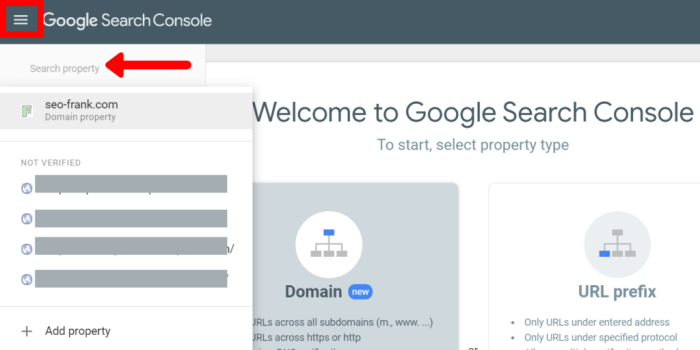
Search Console domain properties are crucial for your website’s visibility and success in search results. They act as the digital fingerprints that identify your site to Google’s search algorithms. Understanding how to correctly configure and manage these properties is key to optimizing your website’s crawl data, indexing, and overall search performance. This comprehensive guide delves into everything you need to know about setting up, managing, and troubleshooting search console domain properties.
From basic setup to advanced troubleshooting, this article covers all the essential aspects of Search Console domain properties, including various verification methods, managing multiple properties, the impact on crawl data, and common technical issues. We’ll explore best practices for maximizing your website’s visibility and avoiding common pitfalls.
Understanding Domain Properties
Domain properties in Google Search Console are crucial for connecting your website to the search engine. They act as identifiers, allowing Google to understand and index your site effectively. By adding and verifying these properties, you empower Google to crawl and understand the structure of your site, leading to better search results for your users.Domain properties are essentially the digital addresses of your website.
They provide a standardized way for Google to identify and track the various versions of your site, like your main site, mobile site, or different subdomains. Properly configured domain properties allow for a more accurate and comprehensive understanding of your site’s content and structure, improving the overall search experience.
Domain Property Types
Search Console supports various domain property types, reflecting the different ways a website can be structured. The most common types include:
- Main Site: This represents the primary domain, like example.com. It’s the core of your website and often the primary target for search engine optimization efforts.
- Subdomains: These are specific parts of your main domain, such as blog.example.com or shop.example.com. Verifying these allows Google to index content on those specific subdomains effectively.
- Mobile Sites: If you have a separate mobile version of your website, like m.example.com, verifying this property helps Google crawl and index the mobile site independently, ensuring proper mobile-friendliness considerations.
Adding a Domain Property
Adding a domain property to Search Console involves linking your website’s address to your Google account. This process is straightforward and generally involves the following steps:
- Log in to your Google Search Console account.
- Navigate to the “Property” section.
- Click the “Add property” button.
- Enter your website’s domain name (e.g., example.com).
- Select the appropriate domain property type (e.g., main site, subdomain).
- Follow the instructions to verify your website’s ownership.
Verification of Domain Ownership
Verifying domain ownership is a critical step in establishing trust and control between your website and Search Console. This verification ensures that you are the legitimate owner of the website, preventing unauthorized access and ensuring accurate indexing.
Verification Methods
The verification process utilizes different methods, each with its own set of instructions. The table below summarizes various verification methods and their steps:
| Verification Method | Description | Steps | Example |
|---|---|---|---|
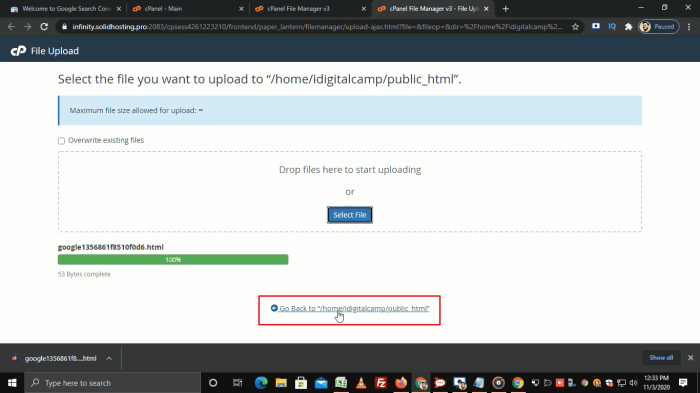
| HTML file | Upload a specific file to the server | 1. Download the verification file from Search Console. 2. Upload the file to your website’s root directory. 3. Verify ownership in Search Console. | index.html |
| Meta tag | Add a specific meta tag to the website’s HTML | 1. Copy the verification code from Search Console. 2. Paste the code into the “ section of your website’s HTML file. 3. Verify ownership in Search Console. |
Managing Multiple Properties
Search Console is a powerful tool, but managing multiple websites or subdomains within a single account can quickly become overwhelming. This guide will walk you through the process of adding and managing various properties, ensuring you’re getting the most out of Google’s search data for all your online presences. Efficient management of multiple properties is crucial for keeping track of performance across all your domains and for making informed decisions based on the comprehensive data collected.Managing multiple properties in Search Console involves a structured approach, allowing you to consolidate data from different domains under a single umbrella.
This not only simplifies tracking but also enables comprehensive analysis of performance across your entire online portfolio. The core concept revolves around associating multiple domains or subdomains within your Google Search Console account. This facilitates unified performance monitoring, allowing for a more holistic understanding of your overall online presence.
Adding New Properties
Adding new properties to your Search Console account is straightforward. You can add subdomains, top-level domains, and even mobile-specific versions of your sites. This allows you to track and analyze the performance of each domain individually while maintaining an overview from a central dashboard. Each property represents a distinct website or part of a website that you want to monitor in Search Console.
Managing Properties from a Single Dashboard
Once you’ve added multiple properties, the dashboard offers a unified view of all your domains. This centralized approach allows you to easily switch between properties, compare performance metrics, and identify trends across your entire portfolio.
- To switch between properties, use the dropdown menu at the top of the dashboard. This allows for a seamless transition between the performance reports of different sites.
- Search Console’s interface allows you to quickly filter and view data for specific properties, making it easy to compare performance metrics across various domains. This facilitates the identification of any discrepancies or patterns across the different websites or subdomains.
- You can also compare data between properties. This is achieved through the various reporting features, allowing for a side-by-side comparison of performance indicators like organic traffic, rankings, and crawl errors.
Managing Subdomains
Subdomains are separate entities from the main domain. Managing them requires adding them as distinct properties in your Search Console account. This allows for accurate tracking of their performance, separate from the main website.
Managing Other Properties
Other properties might include different language versions of a website, or even mobile-specific versions. Each of these represents a separate entity that needs to be added as a distinct property for comprehensive tracking and analysis.
Flowchart of Managing Multiple Properties
The process of managing multiple properties in Search Console involves a straightforward series of steps. This flowchart Artikels the steps to manage multiple properties in Search Console effectively.
(Note: A visual flowchart would illustrate the process. The flowchart would show steps like adding a new property, selecting the property, reviewing data, and comparing across properties. This image placeholder is for a visual representation.)
Setting up search console domain properties is crucial for tracking your website’s performance. Knowing how to build high-quality backlinks is key to boosting your site’s visibility in search results, and top 5 link building tips can help you immensely in that process. Ultimately, understanding your website’s performance through search console domain properties allows you to refine your link building strategies for even better results.
Domain Property and Crawl Data: Search Console Domain Properties
Domain properties in Google Search Console are crucial for understanding how Googlebot crawls and indexes your website. Properly configured domain properties allow for accurate data collection, which is vital for optimizing your site’s visibility in search results. Incorrect configurations can lead to significant issues with crawl coverage and indexation, impacting organic traffic. This discussion delves into the intricate relationship between domain properties and crawl data, exploring the effects of both correct and incorrect configurations.Understanding how domain properties affect crawl data is paramount for success.
Googlebot, the automated crawler, needs clear instructions on which parts of your website to explore. Properly defined domain properties provide these instructions, enabling Googlebot to discover and process content efficiently.
Setting up search console domain properties is crucial for SEO, but often overlooked in the hustle and bustle of B2B marketing. Understanding the nuances of these properties can significantly impact your online visibility. This directly relates to the top challenges in B2B marketing, like lead generation and brand awareness, as optimizing for search engines is fundamental. If you’re not targeting the right keywords and ensuring your website is easily crawlable, your efforts in areas like content creation and social media marketing can fall flat.
Knowing your search console domain properties is a vital piece of the puzzle to improve your SEO performance. Check out this article for more insight on top challenges in B2B marketing: top challenges in b2b marketing.
Impact of Domain Properties on Crawl Data
Domain properties essentially act as a map for Googlebot. A correctly configured property ensures Googlebot understands the structure and scope of your website. This allows for comprehensive crawl coverage, where all relevant pages are discovered and processed. Conversely, incorrect or missing properties can lead to significant omissions in the crawl data.
Examples of Incorrect or Missing Domain Properties Affecting Crawl Coverage
Incorrect or missing domain properties can lead to several issues. For instance, if a subdomain is not included in the domain property, Googlebot might not crawl the content on that subdomain, leading to a significant portion of your website being unseen. Similarly, if a particular page or section of your site is dynamically generated, but not properly included in the domain property, the crawler might not be able to find and index that content.
Consequences of Incorrect Domain Property Configuration on Indexation
Incorrect domain property configurations can negatively impact indexation. If Googlebot fails to crawl critical pages, those pages will not be indexed, which means they won’t appear in search results. This can drastically reduce your website’s visibility and impact organic traffic. Furthermore, inaccurate domain properties might result in duplicate content issues if different properties are set up for similar or identical content.
Comparison of Crawl Budget for Different Domain Properties
The crawl budget is the amount of time and resources Googlebot dedicates to crawling a website. The crawl budget for different domain properties is not directly comparable in a simple numerical way. Factors such as the size, complexity, and structure of the website, as well as the frequency of content updates, play a crucial role. A properly structured domain property, covering all the necessary sections, can allow Googlebot to efficiently utilize its crawl budget and discover all the important pages on your site.
Effects of Using Multiple Domain Properties for the Same Site
Using multiple domain properties for the same website can lead to significant problems. This can result in duplicate content issues, where the same content is indexed under different URLs. This confusion can lead to poor rankings and a diluted search presence. A unified, correctly configured domain property ensures that Googlebot crawls and indexes your site consistently, avoiding any such issues.
Setting up search console domain properties is crucial for website visibility, but sometimes, you might find your organic search performance isn’t quite hitting the mark. This could be a sign that your business needs a helping hand with its online presence. Are you struggling with consistent traffic, or seeing a dip in rankings? Perhaps exploring the various aspects of digital marketing, like 6 signs your business needs a digital marketing agency , would help.
Regardless, accurately setting up search console domain properties is essential for optimizing your website’s performance and making the most of your digital marketing efforts.
Influence of Domain Properties on the Accuracy of Search Results
Properly configured domain properties contribute to the accuracy of search results. When Googlebot has a clear understanding of the website structure through accurate domain properties, it can provide more relevant search results to users. This leads to a better user experience and a more effective search engine optimization strategy.
Technical Issues and Troubleshooting
Navigating Google Search Console can sometimes feel like a maze. Knowing how to identify and resolve technical issues related to your domain properties is crucial for ensuring your site is crawled and indexed effectively. This section provides a deep dive into common problems and their solutions.Troubleshooting domain property issues involves understanding the potential causes and applying the right corrective actions.
A thorough understanding of these issues will empower you to maintain optimal visibility for your website.

Common Verification Issues
Verification failures are often the first roadblock in setting up Search Console. These failures typically stem from errors in the verification process itself, such as incorrectly uploading files or using the wrong method for your domain type. Careful attention to detail is key to avoiding these problems.
- Incorrect file upload:
- The verification process often requires uploading a specific file to your website’s root directory or a designated folder. Incorrect file names, incorrect file content, or uploading the file to the wrong location will lead to verification failure.
- Using the incorrect verification method:
- Search Console offers several verification methods. Using a method not appropriate for your domain type (e.g., using a meta tag for an HTML file instead of an HTML file for a DNS record) will result in a failed verification.
- Technical problems with your website:
- Issues with your web server, file permissions, or other technical aspects of your website can prevent the verification process from completing successfully.
Troubleshooting Verification Errors
To effectively troubleshoot verification errors, systematically examine the specific error messages provided by Search Console. Each error points to a specific problem that needs to be addressed.
- Checking error messages:
- Search Console provides detailed error messages that pinpoint the exact nature of the verification issue. Carefully reviewing these messages is the first step in resolving the problem.
- Reviewing verification instructions:
- Refer to the specific instructions provided by Search Console for your chosen verification method. Following the instructions precisely is essential for successful verification.
- Checking file permissions:
- If you’re using a file upload method, ensure the file has the correct permissions to be accessible by the web server.
Common Crawl Errors, Search console domain properties
Crawl errors in Search Console indicate issues with how Googlebot is accessing and processing your website. These issues can significantly impact your site’s visibility in search results.
- HTTP error codes:
- HTTP error codes like 404 (Not Found) or 500 (Internal Server Error) during the crawl indicate problems with your website’s structure or server functionality. These errors prevent Googlebot from accessing the intended content.
- Blocked resources:
- Ensuring that critical resources, such as JavaScript files, CSS files, and images, are not blocked by robots.txt or other server-side configurations is crucial for proper crawling.
- Incorrect redirects:
- Incorrect or missing redirects can confuse Googlebot, leading to crawl errors. Properly configured redirects ensure that Googlebot is directed to the correct destination.
Error Resolution Table
The table below summarizes common issues and their solutions.
| Issue | Possible Cause | Solution |
|---|---|---|
| Verification failure | Incorrect file upload or meta tag, or technical issues with your website | Re-verify using the correct method, double-check file upload, or address underlying technical issues. Contact your web hosting provider if necessary. |
| Crawl errors (e.g., 404 errors) | Missing or incorrect pages, server issues, or configuration errors in robots.txt | Ensure all pages are accessible, fix server issues, and review robots.txt for any blocking directives. Use the Search Console’s Crawl Errors report to identify specific issues. |
| Crawl errors (e.g., 500 errors) | Server-side errors, such as database or application problems. | Identify and resolve the server-side error by consulting with your web developers or hosting provider. |
Best Practices for Domain Properties
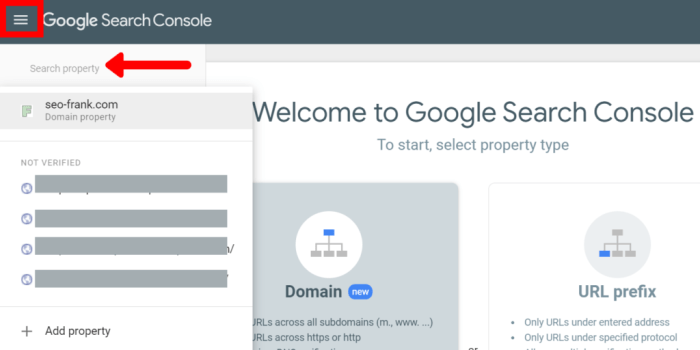
Setting up and managing multiple domain properties in Google Search Console can be complex. Understanding best practices is crucial for ensuring your site’s visibility and avoiding issues with crawl efficiency, duplicate content, and redirect loops. This guide details key strategies for optimizing your domain properties.Effective configuration of domain properties in Search Console is essential for proper indexing and visibility.
Ignoring best practices can lead to inaccurate crawl data, duplicate content penalties, and hindered organic search performance. The following sections Artikel the recommended approaches for achieving optimal results.
Configuring Domain Properties for Crawl Efficiency
Proper configuration of your domain properties directly impacts how Googlebot crawls and indexes your site. A well-structured setup ensures efficient crawling, leading to quicker indexing and improved search rankings. Setting up your properties correctly is vital for optimal crawl performance.
- Prioritize the preferred domain: Designate one domain as your preferred sitemap. This helps Googlebot understand the primary version of your site. For example, if your primary site is www.example.com, set this as your preferred domain to avoid duplicate content issues. This also reduces crawl overhead.
- Implement proper sitemaps: Submit sitemaps that accurately reflect your site structure. Use a sitemap for your primary domain to ensure Googlebot can easily navigate your content. Ensure your sitemaps are regularly updated to reflect changes on your site.
- Optimize robots.txt: Use a robots.txt file to guide Googlebot on which parts of your site to crawl. This helps avoid crawling irrelevant or inaccessible content. Make sure to correctly configure your robots.txt to prevent issues with accessing crucial parts of your website.
Handling Redirects and Canonicalization
Managing redirects and canonicalization is critical for maintaining a seamless user experience and avoiding duplicate content issues. Implementing correct redirects and canonical tags is crucial for avoiding issues like broken links and duplicate content penalties.
- Implement 301 redirects for permanent changes: Use 301 redirects for permanent changes in URLs. This tells search engines that a page has moved permanently and passes link equity to the new location. This is crucial for maintaining the site’s health.
- Use canonical tags to specify preferred versions: Use canonical tags to specify the preferred version of a page when multiple URLs point to the same content. This prevents search engines from indexing duplicate content, leading to better search results. For example, indicates the canonical version of the page.
- Avoid redirect chains and loops: Ensure your redirects do not create a chain or loop, which can lead to broken links and poor user experience. Check for redirect chains and loops to avoid issues with search engine crawlers.
Avoiding Duplicate Content Issues with Multiple Domain Properties
Using multiple domain properties for the same site can lead to duplicate content issues if not managed correctly. This can negatively impact search rankings and user experience. It’s important to address potential duplicate content issues stemming from multiple domain properties.
- Use the preferred domain setting correctly: Ensure you correctly configure the preferred domain in Search Console for your primary site. This helps search engines understand which version of your site is the main one.
- Implement consistent URLs across properties: Maintain consistent URLs across all domain properties for the same content. This avoids confusion for search engines and prevents duplicate content issues. This is crucial for accurate indexing.
- Utilize canonicalization techniques effectively: Use canonical tags to point to the preferred version of a page when content appears on multiple domains. This tells search engines which URL to index and avoid duplicate content penalties.
Importance of Consistent URLs Across Different Properties
Maintaining consistent URLs across your domain properties is paramount for optimal performance. This ensures search engines can easily understand and index your content, avoiding confusion and duplicate content issues. Consistency in URLs is crucial for preventing indexing problems.
- Maintain consistent URLs across different versions of your site: Ensure that URLs for similar content are the same on all versions of your site. This is essential for preventing duplicate content issues.
- Avoid unnecessary variations in URLs: Avoid using unnecessary variations in URLs. For instance, avoid variations in the use of capital letters or different extensions. This reduces confusion for search engines and improves indexing.
Epilogue
In conclusion, correctly configuring your search console domain properties is paramount for ensuring your website is accurately indexed and crawled by search engines. By understanding the different verification methods, managing multiple properties, and addressing potential technical issues, you can significantly enhance your website’s visibility and ranking. By implementing the best practices discussed in this guide, you’ll be well-equipped to navigate the complexities of domain properties and achieve optimal search performance.