Tonfotos: Revolutionizing Local Photo Management with AI-Powered Genealogy and Privacy-Focused Archiving

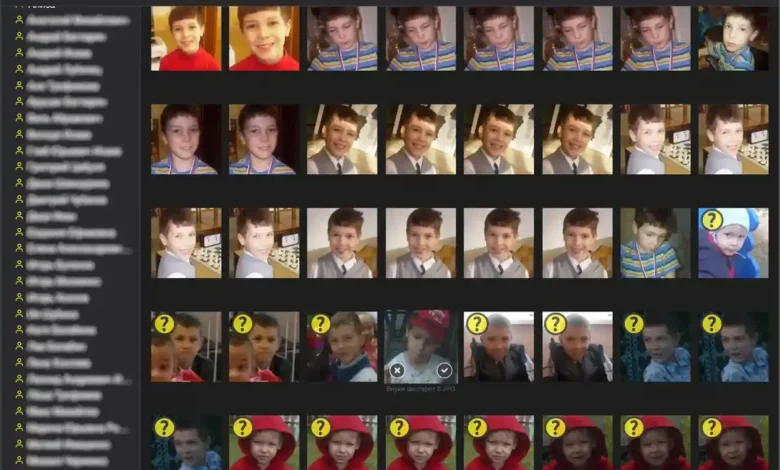
Tonfotos emerges as a distinctive desktop photo management software, meticulously engineered to address the complex challenges of organizing vast personal and family photo archives spanning decades. Unlike the prevailing cloud-based solutions such as Google Photos or Apple iCloud, Tonfotos champions a local-first approach, ensuring that users retain complete control over their digital memories without the imposition of recurring subscriptions or the inherent privacy trade-offs associated with cloud storage. This innovative platform integrates a sophisticated AI face-recognition engine with robust genealogy tools, offering a compelling solution for individuals seeking to meticulously curate and preserve their visual heritage on their own hardware. Positioned as an essential component within an AI productivity stack, Tonfotos fills a critical niche for offline photo archive management, a domain where mainstream cloud AI tools often fall short due to their reliance on remote servers and subscription models.
The Evolving Landscape of Digital Photo Management
The journey of photo archiving has dramatically transformed over the past century, evolving from physical albums and shoeboxes filled with prints to the current era of digital ubiquity. Early digital cameras and scanners initiated the shift, but the advent of smartphones with high-resolution cameras democratized photography, leading to an unprecedented explosion in personal image collections. This "digital deluge" has created a new set of challenges: fragmented libraries across multiple devices, pervasive duplication, and a severe lack of meaningful organization.
For many years, cloud services like Google Photos and iCloud offered a seemingly convenient panacea, providing automatic backups, basic categorization by date, and rudimentary facial recognition. However, this convenience often comes with significant caveats. Users frequently encounter data caps, the necessity of continuous internet connectivity, and, most critically, concerns over data privacy and ownership. The implicit agreement to surrender some control over personal data to third-party servers has become a point of contention for a growing segment of users. Furthermore, these mainstream cloud platforms, while excellent for casual sharing and chronological browsing, typically lack the depth required for serious genealogical work or the management of deeply intertwined family histories that often span generations and include scanned heirloom prints alongside modern digital captures. Paid editing software, such as Adobe Lightroom, while powerful for image manipulation, is fundamentally designed for professional workflows rather than comprehensive historical archiving and family-tree integration. This divergence has created a clear demand for a solution that prioritizes local control, robust organization, and specialized genealogical features, a demand Tonfotos is uniquely positioned to meet.
Tonfotos: A Deep Dive into its Core Offerings
Tonfotos distinguishes itself through a suite of features specifically tailored for the meticulous management of extensive personal photo collections, emphasizing control, privacy, and historical context.
-
AI-Powered Face Recognition and Genealogical Integration: At the heart of Tonfotos lies its advanced AI-driven face recognition engine. This technology actively scans photos, intelligently identifying and suggesting tags for individuals detected within images. Crucially, the system is designed to learn and improve over time; the more users manually tag and confirm identities, the higher the accuracy of future suggestions becomes. This iterative learning process significantly streamlines the often-daunting task of organizing large archives, transforming what could be a multi-week manual project into a manageable, AI-assisted workflow. Batch confirmation features allow users to accept dozens of suggested matches simultaneously, dramatically accelerating the tagging process. What truly sets Tonfotos apart is the seamless integration of this facial recognition with robust genealogical tools. Users can create detailed "person cards" for each individual, complete with birth dates, relationships, and the ability to construct intricate family-tree structures. Tonfotos visualizes these connections, enabling users to navigate between relatives with a single click, effectively merging a sophisticated photo manager with a lightweight, yet powerful, genealogy application. This dual functionality allows users to not only identify who is in a photo but also understand their place within a broader family narrative.
-
Comprehensive Photo Organization Tools: Beyond facial recognition, Tonfotos provides a versatile array of organizational capabilities. Users can categorize their vast libraries by date, specific events, individuals, or geographical locations. The intuitive timeline browsing feature allows for fluid navigation through decades of memories. For geo-tagged photos, a dedicated map view offers a unique spatial perspective on where memories were captured. Furthermore, animated slideshows transform static image collections into engaging visual narratives, making the exploration of a 50,000-photo library feel less like a tedious search through digital folders and more like flipping through a thoughtfully curated family album.
-
Data Management and Efficiency: Recognizing the common pitfalls of large digital archives, Tonfotos incorporates essential tools for data hygiene and efficiency. Its duplicate photo removal function actively identifies and eliminates exact copies, a pervasive problem stemming from multiple backups across different storage devices. This feature not only frees up valuable storage space but also ensures the integrity and coherence of the photo library without requiring painstaking manual review of thousands of files. The software also offers comprehensive metadata editing capabilities, allowing users to view and modify crucial information such as photo dates, capture locations, and camera settings. This is particularly invaluable for scanned historical photos, which often lack embedded GPS or date metadata. Users can manually add this information, ensuring these older images are correctly sorted and integrated alongside modern digital shots, thereby enriching the chronological accuracy of the archive.
-
Image Resizing & Format Conversion: To cater to diverse user needs, Tonfotos includes practical image manipulation tools. Users can convert images to popular formats like JPG and resize them for various purposes, whether for web sharing or high-quality printing. The software also handles geo-tagged photo mapping, offers a full-screen preview mode for detailed viewing, and provides flexible storage options, allowing users to keep their archives on local drives, external hard drives, or Network Attached Storage (NAS) devices, reinforcing the commitment to user control and local data residency.

-
User Experience and Accessibility: Despite its powerful features, Tonfotos is designed with user-friendliness in mind. The interface is clean and intuitive, ensuring that even users with extensive archives but limited technical expertise can effectively manage their collections. The ability to perform batch operations, such as confirming multiple AI suggestions, is critical for making large archives manageable rather than overwhelming. The software’s availability across macOS, Windows, and Linux also ensures broad accessibility.
The Tonfotos Economic Model: A Stand Against Subscriptions
In an era dominated by subscription-based software models, Tonfotos takes a refreshingly distinct approach by offering a one-time purchase license. This economic model is a significant differentiator and a key part of its appeal to a specific user demographic.
-
Pricing Structure: Tonfotos offers three distinct plans:
- Free: This tier provides full core functionality but imposes a limit on the number of people that can be tagged in photos. It also collects anonymous usage statistics. This generous free offering allows prospective users to thoroughly test the software’s capabilities and determine if it meets their needs before committing financially.
- Personal: Priced at a one-time fee of $39, this license removes the limit on the number of tagged individuals, includes priority email support, and allows users to disable anonymous statistics collection. It caters to individual users with large, deeply personal archives.
- Family: For $99, also a one-time purchase, the Family license extends coverage to up to five devices. It includes all Personal features and adds the crucial ability to synchronize person data across multiple users, facilitating collaborative family history projects, and supports cross-OS installation.
-
Implications of the Perpetual License: The decision to offer a perpetual license stands in stark contrast to the industry trend of recurring subscription fees. This model offers several compelling advantages:
- Predictable Cost: Users pay once and own the software indefinitely, eliminating ongoing expenses. This is particularly appealing for long-term archiving projects where costs can otherwise accumulate significantly over years.
- Data Ownership and Control: The one-time purchase reinforces the philosophy of local data ownership. Users are not tethered to a service provider through continuous payments, further emphasizing their autonomy over their digital assets.
- Resistance to Vendor Lock-in: Without a subscription, users are less susceptible to price increases or changes in service terms that often accompany cloud-based, subscription-only platforms.
- Market Niche: This pricing strategy likely appeals to a segment of users who are disillusioned with subscription fatigue and actively seek out software that offers outright ownership, aligning with a broader movement towards "de-clouding" personal data. This positions Tonfotos as a value-driven alternative in a market saturated with recurring payment models.
Competitive Analysis and Market Positioning
Tonfotos operates within a diverse ecosystem of photo management solutions, each with its own strengths and weaknesses. Understanding its position relative to competitors highlights its unique value proposition.
-
vs. Google Photos: While Google Photos offers excellent auto-organization by face and date, coupled with a generous 15GB of free cloud storage, its fundamental difference lies in its cloud-centric nature. All data resides on Google’s servers, raising privacy concerns and limiting local control. Crucially, Google Photos lacks any integrated genealogy layer, making it unsuitable for serious family history projects. Tonfotos, by contrast, prioritizes local archiving, offering superior privacy and control, though it foregoes automatic phone-to-cloud backup. This comparison underscores Tonfotos’ focus on robust, private, local archiving rather than ubiquitous cloud synchronization.
-
vs. Daminion: Daminion is a powerful Digital Asset Management (DAM) solution with strong face recognition capabilities, often catering to enterprise-grade asset management. However, its pricing structure and interface are typically designed for corporate environments, making it less accessible and intuitive for the average family user. The interface can feel dated and overly complex for personal use. Tonfotos, while offering similar core AI features, presents a more user-friendly, family-oriented experience at a significantly more accessible price point.
-
vs. DigiKam: DigiKam stands out as a robust, open-source, and free photo management application. While it offers extensive features, its interface is often described as dense and challenging for casual users. Moreover, its face recognition quality, while functional, is generally considered noticeably weaker than more modern, specialized AI implementations. For users who find DigiKam’s complexity overwhelming or its AI less accurate, Tonfotos offers a compelling paid alternative, where the $39 Personal license is a worthwhile investment for a superior user experience and more refined AI performance.
Tonfotos effectively carves out a niche between overly simplistic cloud services and overly complex enterprise or open-source solutions. It targets users who demand advanced AI features and comprehensive organization but insist on local control, data privacy, and a user-friendly interface for managing their irreplaceable personal and family photo legacies.

Implementing Tonfotos: A User’s Journey
Getting started with Tonfotos is designed to be straightforward, guiding users through the process of bringing their digital archives under control.
- Download and Installation: Users can download the software for macOS, Windows, or Linux directly from the Tonfotos website. The installation process follows standard conventions: a simple click-installer for Windows and a drag-to-Applications for Mac users. This multi-platform support ensures broad accessibility.
- Initial Setup and Indexing: Upon the first launch, Tonfotos prompts the user to specify their photo storage locations. This can include default system folders, custom paths on local drives, external hard drives, or Network Attached Storage (NAS) devices. Users also have the option to select a light or dark theme for the interface. Once the storage locations are defined, Tonfotos commences its initial scan and indexing process. The duration of this process is directly proportional to the size of the photo archive; a collection of 50,000 photos, for instance, might take several hours to fully index on a typical home computer. This initial scan is critical for building the software’s internal database and enabling its AI functionalities.
- The Iterative Nature of AI Learning: Once the initial scan is complete, users are encouraged to navigate to the "People" section to begin tagging individuals. This manual tagging is not merely a data entry task; it’s a crucial step in "training" the AI. Every manual tag and confirmation significantly enhances the AI’s learning model, leading to increasingly accurate suggestions for future identifications across the entire archive. This iterative process ensures that the software continuously improves its performance based on user interaction, making large-scale tagging progressively more efficient.
- Smartphone Import Functionality: For users who regularly capture photos on their smartphones, Tonfotos simplifies the import process. By connecting a smartphone via USB, Tonfotos automatically detects the device and offers a batch import option for all new photos. This eliminates the need for manual file copying or reliance on cloud synchronization, further reinforcing the local-first philosophy.
- Integration with Professional Workflows: For photographers, especially those managing portrait pipelines, Tonfotos can serve as an invaluable archiving companion. It pairs well with other specialized AI tools, such as AI headshot generators, which are used to produce portfolio-grade output. Once high-quality images are generated, Tonfotos provides the organizational backbone to store, tag, and retrieve them efficiently.
The Broader Ecosystem: Pairing Tonfotos with AI Productivity Tools
While Tonfotos excels at organizing and managing photo archives, it is designed to be part of a larger digital ecosystem, complementing other specialized AI tools for content creation and enhancement. This integration forms a "local-first AI stack" for comprehensive digital media management.
- Archiving and Restoration: Before importing old or low-resolution scans into Tonfotos, an AI upscaler like Nightmare AI can be utilized to restore and enhance image quality. This ensures that the foundational assets within the archive are of the highest possible resolution and clarity, making them more suitable for long-term preservation and display. Tonfotos then takes over for organization and contextualization.
- Content Creation and Storytelling: Tonfotos handles the archival layer, but for transforming organized photo collections into dynamic, shareable video content, tools like Pictory AI become invaluable. Pictory AI can generate videos with AI narration and B-roll footage from text or existing media, allowing users to create compelling visual stories from their meticulously organized Tonfotos archives. This synergy enables users to move beyond mere storage to active storytelling, bringing their family history to life.
- A Clean Local-First Stack: The combination of Tonfotos for organization, an AI upscaler for restoration, and a video creation tool for output represents a powerful, local-first workflow. This stack caters to individuals and families who are serious about their digital legacy, offering a comprehensive solution that prioritizes privacy, control, and efficiency across the entire lifecycle of digital memories. It empowers users to manage their digital content on their own terms, free from the constraints and data privacy concerns of purely cloud-based ecosystems.
Addressing User Concerns: FAQs and Developer Philosophy
Tonfotos addresses common user inquiries and reflects a developer philosophy centered on user control and digital legacy.
- Is there a free version of Tonfotos? Yes, the free license offers full core functionality with no time limit, though it caps the number of people that can be tagged. This allows users to experience the software’s capabilities before considering a paid upgrade. The Personal license, for a one-time fee of $39, removes this tagging cap and includes priority support. This tiered approach is designed to be accessible and transparent.
- Can I import photos from my smartphone? Absolutely. Connecting a smartphone via USB allows Tonfotos to automatically detect the device and facilitate a batch import of all new photos, streamlining the process of transferring mobile memories to the local archive without manual file management.
- Can Tonfotos handle very large photo collections? Indeed, Tonfotos is explicitly designed for extensive photo libraries. Features such as duplicate removal, flexible local storage options (including external drives and NAS), and AI-assisted batch tagging are engineered to scale efficiently with collections comprising 50,000 photos or more. This scalability ensures that the software remains performant and effective even for the most voluminous family archives.
The underlying developer philosophy behind Tonfotos appears to be a strong commitment to empowering users with absolute control over their digital memories. By prioritizing local storage, offering a one-time purchase model, and integrating robust AI and genealogical tools, Tonfotos champions privacy, data ownership, and the preservation of digital legacy in an increasingly cloud-dependent world. This approach resonates with users who value long-term archiving solutions that are both powerful and respectful of personal data.
Conclusion: The Value Proposition of Tonfotos
Tonfotos stands out as a remarkably well-designed and highly effective desktop photo manager, uniquely tailored for families and individuals grappling with the complexities of extensive personal photo archives. Its core strengths lie in its potent combination of AI-powered face recognition, seamless genealogical tree integration, and essential data management features like duplicate removal, all delivered through a privacy-centric, offline operational model. The one-time purchase of the $39 Personal license represents exceptional value, offering a robust suite of features without the burden of recurring subscription costs, a significant advantage in today’s software market.
Tonfotos does not seek to compete directly with ubiquitous cloud services; instead, it offers a distinct alternative for those who prioritize local control, data privacy, and the meticulous preservation of family history. The generous free tier provides an excellent opportunity for prospective users to thoroughly evaluate its workflow and capabilities before committing financially. For anyone managing a substantial personal photo collection who desires complete local control, desires deep genealogical integration, and wishes to avoid cloud lock-in, Tonfotos presents itself as one of the most complete and compelling solutions currently available at its price point. It is a powerful tool for those who take their family photo library seriously, transforming a chaotic collection of digital images into a meticulously organized, historically rich, and enduring family legacy.