Microsoft Edge Update Triggers Frustrating Right-Click Paste Bug in Microsoft Teams Chats


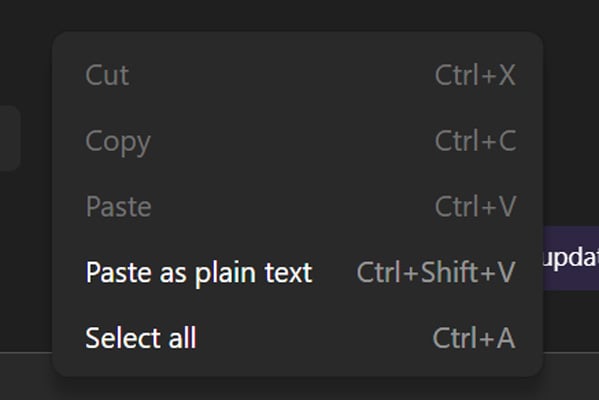
Microsoft is currently addressing a significant technical glitch that has emerged following a recent update to its Microsoft Edge browser. The bug, which was officially acknowledged by Microsoft on April 14th, specifically impacts the functionality of right-click pasting within the Microsoft Teams desktop client’s chat interface. Users have reported a pervasive inability to paste content, including URLs, text, and images, through the conventional right-click context menu, with the "Paste" option appearing greyed out and inaccessible. This disruption has led to widespread user frustration and has prompted a swift, albeit phased, response from the technology giant.
The issue manifests as a frustrating roadblock for users accustomed to the convenience of the right-click paste function. When attempting to paste information into a Teams chat, the context menu that appears upon right-clicking will display the "Paste" option as inactive, rendering it unusable. This forces users to find alternative methods for transferring information, disrupting workflows and potentially leading to inefficiencies. The problem has been observed across various user demographics, from individual users to those operating within large corporate environments, indicating a broad-reaching impact.
Microsoft’s advisory detailed the user experience, stating, "Impacted users report that they are unable to copy and paste URLs, text, and images in Microsoft Teams desktop client chats, as the paste option appears greyed out when using the right-click dropdown menu method." This official confirmation validated the numerous reports that had begun circulating on user forums and social media platforms.
Workaround Provided: Keyboard Shortcuts Remain Functional
While the right-click paste functionality is compromised, Microsoft has been quick to provide a viable workaround for affected users. The company has advised that standard keyboard shortcuts for copying and pasting remain unaffected by the bug. Windows users can continue to utilize Ctrl + C to copy and Ctrl + V to paste, while macOS users can employ Cmd + C and Cmd + V respectively. This crucial detail ensures that essential communication and data transfer within Teams can continue, albeit with a slightly less intuitive method for those accustomed to the mouse-driven approach.
Microsoft elaborated on the workaround, stating, "To bypass impact, we recommended that users attempt to copy the intended URLs, text, and images using Ctrl + C and paste using Ctrl + V for Windows, and corresponding Cmd + C and Cmd + V for Mac." This guidance, while practical, underscores the inconvenience caused by the bug, as it necessitates a shift in user behavior for a fundamental communication feature.

Root Cause: A Code Regression in Microsoft Edge
The underlying cause of this widespread disruption has been identified as a code regression introduced in a recent Microsoft Edge browser update. Microsoft Teams, particularly for certain integrated functionalities, relies on the Edge browser engine. This means that an issue within Edge can directly cascade and affect the performance and features of Teams. The specific regression appears to have inadvertently interfered with how Teams processes the right-click paste command, leading to the observed malfunction.
This revelation highlights the intricate interdependence of modern software applications. Even seemingly unrelated browser updates can have unforeseen consequences on other desktop clients that leverage web technologies for their user interfaces or internal processes. The reliance on embedded browser engines, while enabling cross-platform consistency and rapid development, also creates potential points of failure that can affect a wide range of applications.
User Reports and Community Impact
The emergence of this bug was not confined to isolated incidents. Reports from affected users began to surface on various online platforms, providing valuable real-time feedback to Microsoft and highlighting the extent of the problem. Administrators on Reddit, a popular online forum for technical discussions, and the official Microsoft forums have been actively documenting and discussing the issue.
One such post on Reddit, titled "Seriously Microsoft, now copypaste doesn’t work?", captured the sentiment of many frustrated users. Similarly, Microsoft’s own forums saw a surge of inquiries and complaints. An administrator shared their experience on the Microsoft forums, stating, "I have multiple users on version 26072.519.4556.7438 experiencing this issue, including myself. Cannot right-click Paste, but CTRL+V and paste as text are allowed." This comment further corroborates the specific nature of the bug – affecting only the right-click context menu and not the keyboard shortcuts.
The problem’s prevalence across corporate environments, as reported by administrators, suggests that the bug is not limited to individual user configurations but is a systemic issue stemming from the browser update itself. This broad impact necessitates a robust and timely fix from Microsoft to minimize productivity losses and maintain user confidence in their collaboration tools.
Further anecdotal evidence suggests that common troubleshooting steps, such as reinstalling Microsoft Teams or clearing the application’s cache, have not resolved the issue for many users. This reinforces the conclusion that the problem lies within the browser integration and not within the Teams client’s local data or installation.

Microsoft’s Response and Rollout of a Fix
Upon identifying the cause of the bug, Microsoft initiated the process of developing and deploying a fix. The company has confirmed that it is actively working on a resolution and has begun rolling out the fix in stages. This phased approach allows Microsoft to monitor the situation closely, gather telemetry data, and ensure the stability of the patch before a full global release.
The advisory indicated that Microsoft’s engineering teams have "identified the cause and is rolling out a fix in stages while monitoring telemetry to confirm that systems are recovering." This systematic approach to bug fixing is standard practice for large software deployments, aiming to prevent further unintended consequences.
As of the latest update provided by Microsoft on April 16th, an exact timeline for the complete rollout of the fix has not been disclosed. However, the ongoing deployment and monitoring suggest that a resolution is imminent. Users experiencing the issue are advised to keep their Microsoft Edge and Microsoft Teams applications updated, as the fix will be delivered through regular update channels.
Broader Implications and Analysis
This incident, while seemingly minor in its immediate impact on core functionality, carries broader implications for software development and user experience. It underscores the critical importance of thorough testing and quality assurance, especially when dealing with updates to foundational software components like web browsers that underpin numerous applications.
The reliance on embedded browser engines in applications like Microsoft Teams offers numerous advantages, including faster development cycles and consistent cross-platform experiences. However, as demonstrated by this bug, it also introduces a single point of failure. A flaw in the browser can have a domino effect, disrupting functionalities across multiple dependent applications.
For businesses, such disruptions can lead to tangible productivity losses. When essential communication tools are hampered, even temporarily, workflows can be interrupted, deadlines can be missed, and employee morale can be affected. The quick provision of a workaround, while appreciated, highlights the inherent challenges of managing complex software ecosystems.
The transparency of Microsoft in acknowledging the bug, providing a workaround, and communicating its efforts to resolve the issue is commendable. This approach helps to manage user expectations and maintain trust. However, it also serves as a reminder for organizations to have robust contingency plans in place for critical software failures, even those that may seem unlikely.
The speed at which users reported and discussed the issue on public forums also highlights the power of community feedback in identifying and diagnosing software problems. These platforms often serve as an early warning system, allowing developers to gain insights into user experiences and prioritize fixes.
Looking ahead, this incident may prompt further re-evaluation of testing methodologies and the architectural dependencies within large software suites. Ensuring that updates to core components like browsers are rigorously tested for their impact on dependent applications is crucial for maintaining a stable and reliable user experience. While the immediate problem is being addressed, the underlying technical considerations remain a significant aspect of modern software development. The situation serves as a timely reminder of the complex, interconnected nature of the digital tools we rely on daily and the continuous effort required to ensure their seamless operation.